My drives were full of images that weren't really photos. Chat screenshots, lecture slides, receipts, and pages of notes I'd photographed in 2019 and never opened again, all mixed in with photos I care about.
I wanted them gone, but I also wanted an excuse to put an image model inside a real application for the first time. I ended up using OpenAI's CLIP, loaded from Hugging Face, running entirely on my laptop's CPU. This post is about CLIP. The cleanup tool is the example that keeps it honest.
How CLIP compares images and text
CLIP has two networks. An image encoder turns a picture into a vector, and a text encoder turns a sentence into a vector of the same size. In openai/clip-vit-base-patch32 both vectors have 512 numbers, and the image side is a Vision Transformer that reads a 224×224 image as 32×32 pixel patches.
OpenAI trained the two together on about 400 million image and caption pairs from the internet (the paper). In each step the model compares every image in a batch with every caption and learns to make the real pairs similar and the rest dissimilar. Afterwards, a photo of a receipt and the sentence "a receipt" point in roughly the same direction. Pick an image below to see it.
Similarity is the cosine of the angle between two vectors. If you've worked with text embeddings, it's the same idea I used in my semantic search project, with images on one side.
Why zero-shot fit this problem
A normal classifier has a fixed output layer. Adding a category means collecting labelled examples and training again. With CLIP you write categories as sentences and compare the image against each one. Change the sentences and you've changed the classifier.
That mattered here because "junk" is personal and my categories kept changing. The paper reports that zero-shot CLIP matched the original ResNet-50 on ImageNet without using any of its training images, though that's the largest CLIP model. The small one I used is weaker.
What else I considered
Filename and EXIF rules catch screenshots cheaply, but my notes were camera photos named 20190417_102040.jpg with the same metadata as a family photo. OCR finds documents and also flags memes and street signs. A fine-tuned CNN needs a labelled dataset. A vision-language model like LLaVA understands nuance but generates text token by token, which is slow on a CPU, and a hosted API would mean uploading my photos.
The labels are the model
The tool keeps two editable lists: 10 "find" labels like "a receipt" and "a presentation slide", and 17 "never touch" labels like "a selfie" and "a photo of nature". For each image it computes the cosine similarity to all 27 labels, multiplies by CLIP's learned logit scale (100), and runs softmax to get probabilities. The find probabilities add up to a junk score. An image is flagged only if that score passes the strictness slider (0.6 by default) and the single best label is a find label.
The scale matters because raw similarities sit in a narrow band around 0.15 to 0.3. Without it, softmax gives every label about the same share. Drag the slider below to 1 and you'll see it.
The similarities above are illustrative, tuned to match a real result. An abstract wallpaper scored 0.87 as "a screenshot of a phone screen" because no label described it, and softmax has to give the probability to something. After I added "abstract art" and "a colorful wallpaper", it dropped to 0.29. Turn those two on to see the flip.
CLIP never says "I don't know". It picks the closest label, however poor the match. Every label you add also takes probability away from the others.
The top-label rule came from a worse bug. The first version only checked the junk score, and a few family photos got flagged because ten small find probabilities added up. Making the best match win gave the keep list a veto.
How a scan runs
The app is a small Flask server with a plain JavaScript page. The model is loaded through Transformers on PyTorch.
The scoring is a few lines in clip_filter.py:
similarity = model.logit_scale.exp() * image_features @ text_features.T
probs = similarity.softmax(dim=1).cpu()

junk_score = probs[i][:junk_count].sum().item()
best = probs[i].argmax().item()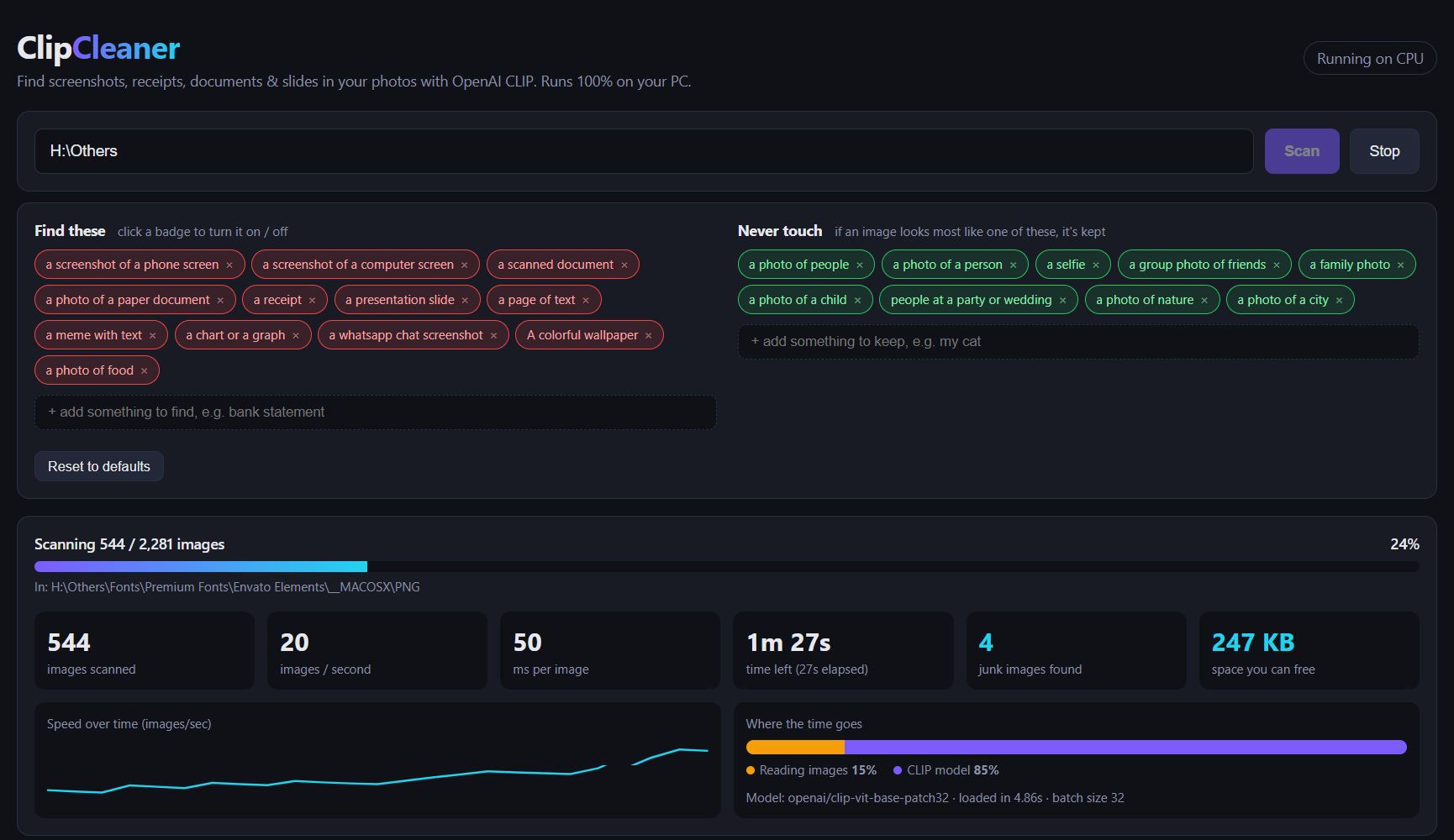
CPU performance
My GTX 1050 Ti's driver was too old for the CUDA 12.6 build of PyTorch, so everything ran on an Intel i7-8750H. Both test folders sat on a spinning laptop hard drive.
The phone backup was slower, but not because of the model. Splitting each run's time showed CLIP at about 57 ms per image in both. The larger phone photos (3.8 MB on average) just took longer to read off the disk.
What kept the CPU path fast: labels encoded once, batches of 32, eight threads for file reads, and Pillow's JPEG draft() mode, which decodes a downscaled image directly instead of a full 12 MP photo. The model is about 600 MB to download once, then it works offline.
Where it falls short
I didn't hand-label a test set, so I don't have an accuracy number. What I saw in review:
- CLIP judges the whole image. A screenshot with a small profile photo is still a screenshot.
- The default processor center-crops to a square, so tall phone screenshots lose their top and bottom.
- CLIP partly reads text in images. OpenAI's multimodal neurons research showed an apple with a paper note saying "iPod" getting classified as an iPod. That helps with documents and can misfire on memes.
- It knows there's a person in a photo, not who.
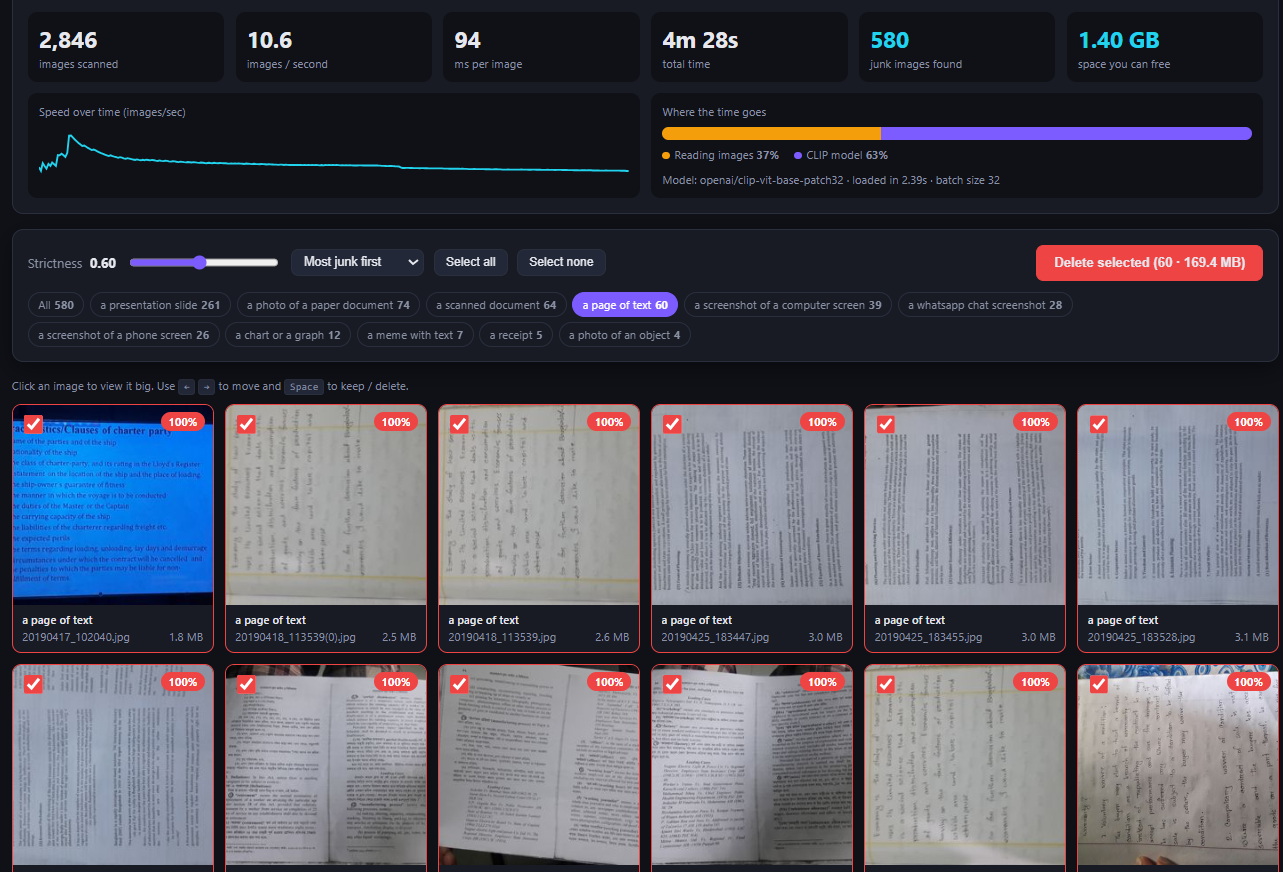
None of this was a dealbreaker because nothing gets deleted without me looking first. The app also isn't ready to share: /image serves any path you give it, results live in memory, and "Show in Explorer" is Windows only.
What I'd tell someone trying this
Treat the label list like code. Every classification bug I hit was fixed by changing labels, so I'd keep a folder of tricky images and rerun it whenever the labels change.
Time the pipeline before you blame the model. I assumed the CPU was the bottleneck, and on the phone backup it was the disk.
Softmax scores aren't confidence. A 0.87 for a wallpaper only meant the screenshot labels were the least bad of the options I gave it.
Zero-shot models work best with a person reviewing the output. CLIP got thousands of images down to a few hundred worth looking at, and I still made the final call on each one.